
Putting 100,000 EUR on a hardware walletHardware walletSmall dedicated device (Ledger, Trezor, Coldcard, BitBox, etc.) that keeps the private key away from a potentially compromised computer. Signs transactions inside the device itself.See in the lexicon → makes sense. Putting 50 EUR on that same hardware to buy a coffee, much less: pulling out the device, plugging it in, signing, putting it away, for every purchase, is unsustainable. The hardware is built for the vaultVaultCustody setup for long-term storage, often multisig, kept offline and touched rarely.See in the lexicon →, not the pocket. A mobile walletWalletSoftware or device that manages your Bitcoin keys and lets you sign transactions. A wallet does not really « hold » your bitcoins, it holds the keys that prove you own them.See in the lexicon → fills that role: a small amount accessible in two taps from the phone, ideal for Lightning and the occasional L1.
This article answers the classic questions. Which app to choose between Phoenix, Muun, Aqua, BlueWallet and Wallet of SatoshiSatoshi (sat)The smallest unit of bitcoin. 1 BTC = 100 million satoshis. Named after the creator. In 2026, talking in sats becomes common as the price of one BTC rises.See in the lexicon →? How to cleanly pair mobile (hot) and hardware (cold)? What risks are specific to the phone that you don't face on a LedgerLedger, Trezor, Coldcard, BitBoxMain hardware wallet brands. Ledger Nano S Plus / X (French, the best-seller), Trezor Model T (Czech, open source), Coldcard Mk4 (Canadian, ultra-secure, Bitcoin-only), BitBox02 (Swiss, open source).See in the lexicon → or a TrezorLedger, Trezor, Coldcard, BitBoxMain hardware wallet brands. Ledger Nano S Plus / X (French, the best-seller), Trezor Model T (Czech, open source), Coldcard Mk4 (Canadian, ultra-secure, Bitcoin-only), BitBox02 (Swiss, open source).See in the lexicon →? And above all, up to what amount can you keep money on mobile without exposing yourself unnecessarily?
Mobile wallet: what it actually is
A mobile walletWalletSoftware or device that manages your Bitcoin keys and lets you sign transactions. A wallet does not really « hold » your bitcoins, it holds the keys that prove you own them.See in the lexicon → is an app installed on a smartphone (iOS or Android) that stores a BIP39BIP39Standard defining the list of 2,048 words used for seed phrases. Lets every wallet brand generate seeds that are compatible with each other.See in the lexicon → seed in the phone's encrypted storage, manages a Bitcoin wallet and lets you receive, send and pay in a few taps. Three features set good apps apart from bad ones.
Non-custodialNon-custodialCommon synonym for self-custody in marketing communications.See in the lexicon →. The private keyPrivate keySecret number that proves ownership of bitcoins at a given address. Whoever holds the private key holds the bitcoins. Never share it and never store it in plain text.See in the lexicon → lives on the phone and nowhere else. The app publisher (ACINQ for Phoenix, Muun Inc., Jan3 for Aqua, the BlueWallet team) has no access to it. You are the sole holder. This is the opposite of pure custodialCustodialModel in which a third party (exchange, broker, neobank) holds your private keys for you. You have a claim, not a bitcoin. « Not your keys, not your coins ».See in the lexicon → (Wallet of SatoshiSatoshi (sat)The smallest unit of bitcoin. 1 BTC = 100 million satoshis. Named after the creator. In 2026, talking in sats becomes common as the price of one BTC rises.See in the lexicon →, for example), where your bitcoins actually live on the publisher's servers, which can block or lose the funds.
Built-in Lightning. In 2026, mobile without Lightning no longer makes much sense. Phoenix and Muun offer a nearly transparent Lightning experience: on-demand channel opening, automatic L1-to-Lightning swaps, sub-cent instant payments. This is the whole point of mobile over desktop.
BIP39 standard. The seed is compatible with any other BIP39 wallet. If Phoenix shuts down tomorrow, you restore the funds on Muun or Sparrow with the 12 or 24 words. No lock-in. To verifyDon't trust, verifyBitcoiner mantra. Trust no one (bank, government, exchange, influencer), verify on your own through your own node.See in the lexicon → explicitly before adopting an app: some apps use proprietary derivations that make recovery elsewhere impossible.
A mobile wallet is not a substitute for hardware. It is a companion, designed for a different use case. The hardware remains essential above 1,000 to 2,000 EUR held, the mobile remains convenient for 50 to 500 EUR of pocket money.
Hot mobile and cold hardware: the pairing
The golden rule of serious Bitcoin storage is to separate uses. The main vaultVaultCustody setup for long-term storage, often multisig, kept offline and touched rarely.See in the lexicon → on cold hardware (LedgerLedger, Trezor, Coldcard, BitBoxMain hardware wallet brands. Ledger Nano S Plus / X (French, the best-seller), Trezor Model T (Czech, open source), Coldcard Mk4 (Canadian, ultra-secure, Bitcoin-only), BitBox02 (Swiss, open source).See in the lexicon →, TrezorLedger, Trezor, Coldcard, BitBoxMain hardware wallet brands. Ledger Nano S Plus / X (French, the best-seller), Trezor Model T (Czech, open source), Coldcard Mk4 (Canadian, ultra-secure, Bitcoin-only), BitBox02 (Swiss, open source).See in the lexicon →, ColdcardLedger, Trezor, Coldcard, BitBoxMain hardware wallet brands. Ledger Nano S Plus / X (French, the best-seller), Trezor Model T (Czech, open source), Coldcard Mk4 (Canadian, ultra-secure, Bitcoin-only), BitBox02 (Swiss, open source).See in the lexicon →) for the bulk of the funds. The daily pocket on hot mobile (Phoenix, Muun) for frequent spending. Each walletWalletSoftware or device that manages your Bitcoin keys and lets you sign transactions. A wallet does not really « hold » your bitcoins, it holds the keys that prove you own them.See in the lexicon → has its role and its comfort threshold.
Why not put everything on mobile? Three reasons.
- The phone is online all the time. Connected to the internet, third-party apps, notifications, automatic updates. Huge attack surface compared to a hardware that sits in a drawer 99 % of the time.
- The phone gets lost, broken, stolen. Brutal statistic: 70 million smartphones lost or stolen per year worldwide. Without a proper mobile seed backup, everything is lost together with the device.
- The touchscreen does not offer the same verification. A mobile malware can display a Bitcoin addressBitcoin addressString of characters that identifies a destination for receiving bitcoins. Four main formats, starting with 1..., 3..., bc1q... or bc1p... (Taproot, the recommended format in 2026).See in the lexicon → and sign a different one. On a hardware with a dedicated screen, that is protocol-level impossible.
Why not put everything on hardware? One reason only: daily friction. No serious bitcoinerBitcoinerPerson interested in Bitcoin, who holds some and adheres more or less to its values (individual sovereignty, sound money, decentralisation).See in the lexicon → pulls out their Ledger to pay for a 3 EUR coffee. This friction is what justifies the existence of a pocket wallet.
The healthy architecture is to set a mobile cap and respect it. Three guidelines:
- Mobile cap at 500 EUR. Suited to a beginner or a daily Lightning user. Losing the phone is annoying but not catastrophic.
- Mobile cap at 1,000-2,000 EUR. For a heavy Lightning user (merchant, freelancer paid in sats, traveller). Requires a carefully backed-up mobile seed and a phone with PIN and biometrics locked.
- Above 2,000 EUR on mobile. Inappropriate. Prefer the hardware with a weekly Lightning top-up routine from L1.
When the Lightning pocket runs low, you top up from the hardware via an L1 transaction to an address of the mobile wallet, then let Phoenix or Muun handle the submarine swapSubmarine swapAtomic exchange between on-chain funds and Lightning funds (and back), trustless, via a provider like Boltz or Lightning Loop. Used to refill or drain channels.See in the lexicon → to Lightning if needed. Plan for 1 to 4 EUR of L1 fees per top-up, amortised over several weeks of spending.
The reference apps in 2026
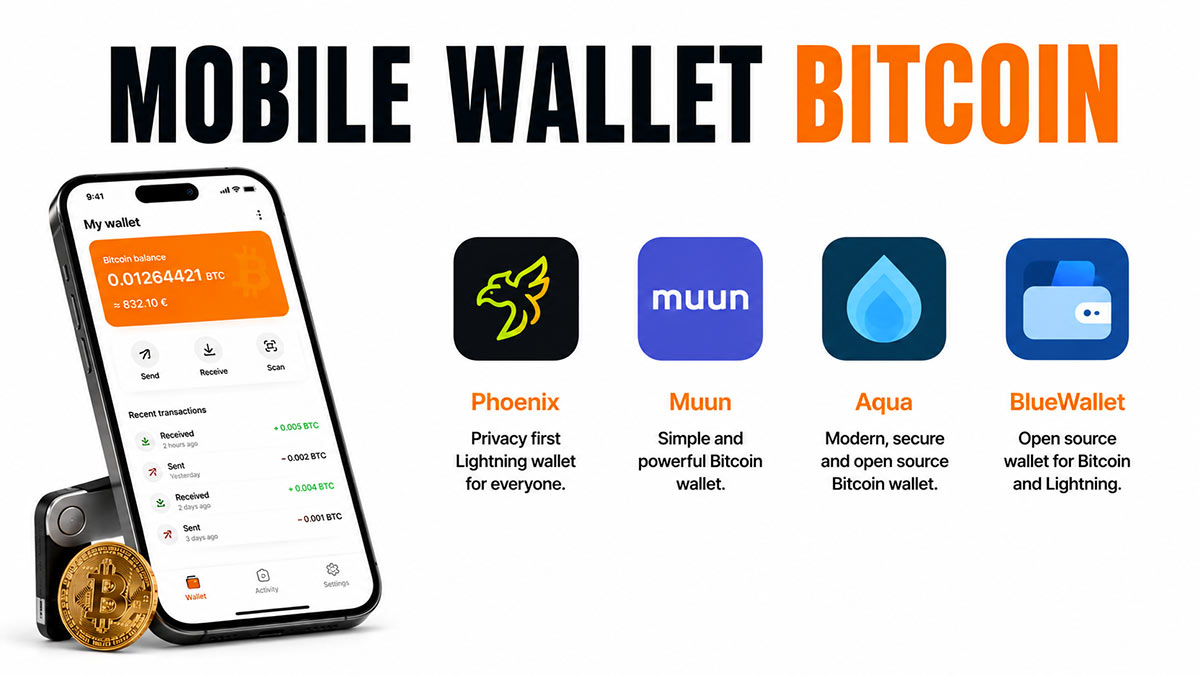
Phoenix (ACINQ, France). The de facto standard for non-custodialNon-custodialCommon synonym for self-custody in marketing communications.See in the lexicon → mobile Lightning. ACINQ runs a Lightning Service Provider (LSPLSP (Lightning Service Provider)Third-party service that helps open Lightning channels and manage liquidity, without holding your funds. Used by mobile wallets like Phoenix.See in the lexicon →) that simplifies the experience to the extreme: no channels to manage manually, no inbound liquidityInbound liquidityCapacity of a Lightning channel to receive payments. To get paid 100,000 sats, you need at least 100,000 sats of inbound liquidity available.See in the lexicon → to source, no routing to optimise. The user pays a small premium on some operations (channel opening, splice) in exchangeExchangeService that lets you buy, sell and swap cryptocurrencies against fiat money. Examples : Kraken, Coinbase, Bitstamp, Bitvavo. Most are custodial.See in the lexicon → for this simplicity. The key stays with the user, the app is open sourceOpen sourceSoftware whose source code is public and modifiable by anyone. A fundamental auditability guarantee in Bitcoin.See in the lexicon →. Default pick for 80 % of Lightning use cases.
Muun (Argentina). The most polished L1 + Lightning hybrid. Muun fully hides the layer distinction: you see a single balance, the app internally decides whether to route via L1 or Lightning depending on the amount and destination. Excellent UX for users who don't want to learn the difference between layers. Fees slightly higher than Phoenix on Lightning because of systematic submarine swaps.
Aqua (Jan3, Samson Mow's team). The 2024 entrant targeting emerging markets (Latin America, Africa). Bitcoin L1 + Lightning + Liquid (Blockstream's Bitcoin sidechainSidechainIndependent parallel chain linked to Bitcoin through a peg-in / peg-out mechanism. Liquid Network is the main Bitcoin sidechain.See in the lexicon →) + Liquid-pegged stablecoins. Very good app for users travelling between euro and dollar/peso zones, or who want some stable to smooth out volatility. Trade-off: the Liquid side involves a Blockstream signer federationFederation (sidechain)Group of entities (exchanges, companies) that co-sign the operations of a sidechain like Liquid. A trust model halfway between a single company and Bitcoin.See in the lexicon →.
BlueWallet (community open source). The multi-feature veteran, active since 2018. Supports L1, Lightning (in custodialCustodialModel in which a third party (exchange, broker, neobank) holds your private keys for you. You have a claim, not a bitcoin. « Not your keys, not your coins ».See in the lexicon → LNDhub mode or via personal nodeNodeComputer that runs the Bitcoin software and takes part in the network by validating blocks and transactions. A « full node » keeps a complete copy of the blockchain.See in the lexicon →), watch-onlyWatch-onlyMode in which a wallet observes balances and address history without holding the private key. Used to monitor a cold vault from a less secure device.See in the lexicon → from an xpubxpub (extended public key)Extended public key. Lets a read-only wallet see addresses and balances without being able to sign. Used for tracking and observation.See in the lexicon →, basic multisigMultisig (multi-signature)Configuration where a transaction must be signed by several independent keys to be valid (for example 2 of 3). Reduces the risk that a single key theft causes loss of funds.See in the lexicon →. Ideal for a technical user who wants to tinker or for specific setups (watch-only on a hardware). Less polished than Phoenix or Muun, more powerful.
WalletWalletSoftware or device that manages your Bitcoin keys and lets you sign transactions. A wallet does not really « hold » your bitcoins, it holds the keys that prove you own them.See in the lexicon → of SatoshiSatoshi (sat)The smallest unit of bitcoin. 1 BTC = 100 million satoshis. Named after the creator. In 2026, talking in sats becomes common as the price of one BTC rises.See in the lexicon → (WoS) (United Kingdom). Custodial Lightning. Ultra simple, ultra smooth, but your bitcoins are on WoS servers, not yours. To consider only for tiny amounts (50 to 200 EUR) and with the clear awareness that it is a Lightning exchange, not a wallet. WoS has already blocked accounts for KYCKYC (Know Your Customer)Mandatory identification procedure that regulated platforms apply to their users : ID document, proof of address, and so on.See in the lexicon → compliance, and temporarily left the US in 2024 under regulatory pressure.
Honourable mentions: Zeus (mobile front-end for a personal Lightning node, advanced level), BitKit (Synonym, experimental, Slashtags integration), Sparrow mobile (2026 beta, watch-only signing).
Secure setup, step by step
Setup is fast, but quality depends on the details. Seven universal steps, valid for Phoenix, Muun, Aqua and BlueWallet.
- Download from the official store. App Store (iOS) or Google Play (Android). VerifyDon't trust, verifyBitcoiner mantra. Trust no one (bank, government, exchange, influencer), verify on your own through your own node.See in the lexicon → the publisher shown: "ACINQ" for Phoenix, "Muun Inc" for Muun, "Jan3" for Aqua, "BlueWallet Services LLC" for BlueWallet. Fake apps copying the logos are numerous.
- Create a new walletWalletSoftware or device that manages your Bitcoin keys and lets you sign transactions. A wallet does not really « hold » your bitcoins, it holds the keys that prove you own them.See in the lexicon →, not a recovery from an existing seed. Pick "create" rather than "restore", unless you are deliberately migrating from a seed you already own.
- Immediate seed backup. The app displays 12 or 24 words. Write them down by hand on paper or metal, in the exact order. No photo, no screenshot, no entry on a computer. Test the verification offered by the app (retype several words in order).
- App PIN enabled. Phoenix, Muun and most apps offer an app-specific PIN, separate from the phone PIN. Always enable it. 6 digits minimum, random.
- Biometrics on top of the PIN, not in its place. Face ID / Touch ID speeds up daily unlocking. Configure it after the PIN, never as the sole mechanism.
- Disable the app's cloud backups. Verify in iOS / Android settings that the app is not included in iCloud Backup or Google Drive Backup. A store-side encrypted backup is not enough protection against a compromised cloud account.
- Test with a small amount. Send 5 to 20 EUR to a wallet address from your exchangeExchangeService that lets you buy, sell and swap cryptocurrencies against fiat money. Examples : Kraken, Coinbase, Bitstamp, Bitvavo. Most are custodial.See in the lexicon → or hardware. Confirm receipt. Then make a small Lightning spend (buy a digital voucher, micropayment to Bitrefill) to verify everything works before raising the balance.
Once the wallet is live, two hygiene habits to adopt:
- Keep the app updated. Security patches are frequent, especially on the Lightning layer which evolves quickly.
- Run an annual recovery test: on another phone (or the same reset), install the app, restore from the seed, check the funds reappear. If yes, your backup is alive.
The risks specific to mobile
Mobile combines the risks of a software walletWalletSoftware or device that manages your Bitcoin keys and lets you sign transactions. A wallet does not really « hold » your bitcoins, it holds the keys that prove you own them.See in the lexicon → with those of a personal device that is permanently exposed. Five hazards to know and anticipate.
- Physical phone theft. Without an app PIN and biometrics, the thief gets access to the wallet within minutes. With a PIN, they have a few attempts before automatic lockout. The seed backup is what lets you recover the funds on a new phone after theft.
- Android or iOS malware. The Android ecosystem is more exposed (less restrictive Play Store, sideload possible); iOS more locked down but not immune. A malware can read notifications, intercept 2FA2FA (Two-Factor Authentication)Two-factor authentication. On top of the password, a second element is required to sign in (TOTP code, SMS, physical key). Standard on every serious platform.See in the lexicon → SMS, even inject a fake interface into a vulnerable app. Preventive measure: only install known apps, refuse sideloads, disable unnecessary permissions.
- Fake payment screen (overlay attack). A malicious app overlays a screen that looks like your wallet and captures inputs (PIN, seed). Counter: the seed backup is never re-entered on the phone after initial setup, so even a perfect overlay cannot extract it if you follow this rule.
- SIM swapSIM swapAttack where a fraudster convinces your phone carrier to transfer your number onto their own SIM card. They then receive your 2FA SMS messages and can take over your accounts.See in the lexicon →. Indirectly harmful. If your exchangeExchangeService that lets you buy, sell and swap cryptocurrencies against fiat money. Examples : Kraken, Coinbase, Bitstamp, Bitvavo. Most are custodial.See in the lexicon → or Lightning service uses SMS 2FA, a SIM swap lets an attacker take over those accounts and, by side effect, the flows to your mobile wallet. Counter: app-based 2FA (Aegis, Raivo, Authy) on every third-party service, never SMS 2FA.
- Loss or destruction of the phone without a tested backup. This is the most frequent scenario. Phone dropped in a pool, broken screen, dead battery, smartphone lost on travel. Without a usable seed backup, the funds are gone.
A special note on custodialCustodialModel in which a third party (exchange, broker, neobank) holds your private keys for you. You have a claim, not a bitcoin. « Not your keys, not your coins ».See in the lexicon → apps such as Wallet of SatoshiSatoshi (sat)The smallest unit of bitcoin. 1 BTC = 100 million satoshis. Named after the creator. In 2026, talking in sats becomes common as the price of one BTC rises.See in the lexicon →. They add a risk: service failure. If WoS shuts down, if your credentials are compromised, if jurisdiction changes and freezes your accounts (real case for US users in 2024), the funds may vanish or be frozen with no recourse. For custodial funds, treat the app as an exchange: no more than what you can lose without consequence.
Disclaimer
Educational and informational content only: not investment, tax or legal advice. Bitcoin carries significant risks, including high volatility and the possible loss of invested capital. Each reader remains responsible for their decisions; when in doubt, consult a qualified professional in your jurisdiction.
Going further
The mobile walletWalletSoftware or device that manages your Bitcoin keys and lets you sign transactions. A wallet does not really « hold » your bitcoins, it holds the keys that prove you own them.See in the lexicon → is the daily pocket, to be paired with the other building blocks of the Store topic:
- Lightning wallet: dedicated focus on Lightning, detailed comparison Phoenix vs Muun vs Wallet of SatoshiSatoshi (sat)The smallest unit of bitcoin. 1 BTC = 100 million satoshis. Named after the creator. In 2026, talking in sats becomes common as the price of one BTC rises.See in the lexicon → on routing, fees, swaps.
- Hardware wallet: the vaultVaultCustody setup for long-term storage, often multisig, kept offline and touched rarely.See in the lexicon → where the bulk of the funds belongs.
- The BIP39 seed phrase: common rules for every backup, including mobile.
- Bitcoin security: phishingPhishingAttack where someone impersonates a legitimate service via email, SMS or clone website, in order to extract your credentials or your seed phrase.See in the lexicon →, SIM swapSIM swapAttack where a fraudster convinces your phone carrier to transfer your number onto their own SIM card. They then receive your 2FA SMS messages and can take over your accounts.See in the lexicon →, malware, daily operational hygiene.
To place mobile back in the topic:
- Store Bitcoin guide: the custodyCustodyThe custody of funds. See self-custody and custodial in the dedicated section below.See in the lexicon → overview.
- Bitcoin multisig: for larger estates where multisigMultisig (multi-signature)Configuration where a transaction must be signed by several independent keys to be valid (for example 2 of 3). Reduces the risk that a single key theft causes loss of funds.See in the lexicon → takes over from mobile.
- Buy your first Bitcoin: upstream prerequisite before any storage.